

Link-Local Multicast Name Resolution (LLMNR) and NetBIOS Name Service (NBT-NS) are two legacy name resolution protocols built into Microsoft Windows. Their purpose is straightforward: when a DNS lookup fails, the operating system falls back to these protocols and broadcasts a query across the local subnet, asking whether any other device recognises the requested hostname. LLMNR, which operates over UDP port 5355, was introduced in Windows Vista as a successor to the older NBT-NS (UDP port 137), which has been present in Windows since the late 1980s. Both remain enabled by default on all current editions of Windows, including Windows 11 and Windows Server 2025.
The fundamental weakness of both protocols is that neither authenticates responses. Any device on the same network segment can answer a broadcast query and claim to be the host the victim is looking for. In a managed corporate environment with functioning DNS infrastructure, these fallback protocols serve no practical purpose, yet their continued presence creates an attack surface that penetration testers and real-world adversaries routinely exploit to capture credentials, move laterally, and achieve domain compromise.
A vulnerability that is not a vulnerability
Microsoft does not classify the default-on state of LLMNR and NBT-NS as a vulnerability, and no CVE has been assigned to the behaviour. From Redmond’s perspective, these are features functioning as designed, and the associated risks are a matter of environmental hardening rather than a software defect requiring a patch. Organisations waiting for a security update to resolve the issue will wait indefinitely.
This position sits awkwardly alongside Microsoft’s own guidance. In November 2024, Microsoft’s Active Directory hardening series stated that organisations should disable LLMNR and NBT-NS on all organisational devices and described how tools such as Responder are used to exploit broadcast name resolution for credential theft. In January 2026, Microsoft announced a three-phase roadmap to disable NTLM by default in future Windows releases, acknowledging the protocol’s susceptibility to relay and man-in-the-middle attacks. NTLM is the authentication mechanism that underpins the entire LLMNR/NBT-NS attack chain, and its formal deprecation in June 2024 signals that the ecosystem these protocols feed into is fundamentally insecure. External bodies are more direct: CISA published countermeasure CM0053 in March 2025 recommending that LLMNR be disabled entirely, and the CIS Benchmarks for Windows 11 (v2.0.0) require the same. MITRE ATT&CK catalogues the technique as T1557.001.
How the attack works
Windows follows a predictable name resolution order: local hosts file, DNS cache, configured DNS server, and then, if all else fails, an LLMNR or NBT-NS broadcast to the local subnet. That broadcast is an open question to every device on the network, and it can be triggered by something as mundane as a mistyped UNC path (\\filesrever instead of \\fileserver), a stale Group Policy preference pointing to a decommissioned share, or a browser’s automatic WPAD proxy detection query.

An attacker running a tool such as Responder listens for these broadcast queries and responds to them, claiming to be the requested host. The victim’s machine then attempts to authenticate to the attacker’s system using NTLM, and in doing so transmits its Net-NTLMv2 hash. This hash can be taken offline and subjected to password cracking, or, more significantly, relayed in real time to other services on the network. The victim does not need to enter credentials into a dialogue box; the NTLM authentication handshake occurs automatically and transparently as part of the normal Windows name resolution process.
Demonstrating the risk
The following section outlines the steps a penetration tester would take to demonstrate this attack chain during an internal infrastructure assessment.
Step 1: Confirm broadcast name resolution is active
Responder can be run in analyse mode to passively observe broadcast traffic without responding to queries:
sudo responder -I eth0 -AIf LLMNR or NBT-NS broadcast queries appear in the output, the network is susceptible to poisoning. In environments where these protocols have not been explicitly disabled, traffic typically appears within minutes.
Step 2: Poison queries and capture hashes
With broadcast traffic confirmed, Responder is configured to actively respond to queries and capture authentication attempts:
sudo responder -I eth0 -dwvWhen a user triggers a failed DNS lookup, their Net-NTLMv2 hash is captured and displayed in the console.

Captured hashes can be cracked offline using Hashcat with mode 5600 (NTLMv2). Where password policies are weak, hashes are frequently cracked within minutes. Where passwords are strong, the hash need not be cracked at all if the conditions for a relay attack are met.
Step 3: Identify SMB relay targets
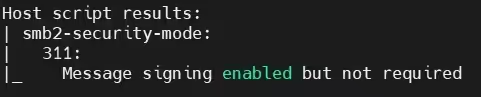
NTLM relay attacks forward the captured authentication in real time to a different host, impersonating the victim. The prerequisite is that the target host does not require SMB signing, the mechanism that digitally signs each SMB message and binds the session to the specific connection. Nmap’s smb2-security-mode script enumerates hosts where signing is not enforced:
nmap --script smb2-security-mode -p 445 192.168.1.0/24Hosts reporting “Message signing enabled but not required” are valid relay targets. In many environments this includes the majority of workstations and member servers, since the Windows default for non-domain-controller systems is to enable but not require signing.
Step 4: Relay captured credentials
The relay attack requires Responder and Impacket’s ntlmrelayx running in tandem. Responder’s SMB and HTTP servers are disabled in /etc/responder/Responder.conf (set SMB = Off and HTTP = Off) so that authentication attempts are forwarded to ntlmrelayx rather than handled locally:
sudo responder -I eth0 -dwv
sudo ntlmrelayx.py -tf targets.txt -smb2support
When a victim’s broadcast query is poisoned, Responder hands the authentication attempt to ntlmrelayx, which relays the credentials to each host in the target list. If the captured account has local administrator privileges on any of those hosts, ntlmrelayx automatically dumps the local SAM database, yielding NTLM hashes for all local accounts on the compromised machine. The -i flag provides an interactive SMB shell, and -c allows arbitrary command execution. In assessments, it is common for a single relayed authentication to yield access to dozens of hosts, and in some cases to provide a path to domain administrator credentials.

The compounding role of SMB signing
Vulnerability scanners such as Nessus classify “SMB signing not required” as a medium-severity finding, and in isolation that classification is reasonable: the absence of signing does not itself permit exploitation, serving instead as a precondition for other attacks. When combined with LLMNR/NBT-NS poisoning, however, the two findings form an attack chain that is substantially more severe than either finding alone. The medium-severity scanner finding becomes the mechanism through which a captured hash is converted into authenticated access across the network, potentially yielding domain compromise. This is a pattern that security teams should watch for: individual findings assessed in isolation at moderate severity can combine to produce critical outcomes, and a penetration test will demonstrate this chained impact in a way that a vulnerability scan alone cannot.
Microsoft has begun to address this at the operating system level. Windows 11 24H2 and Windows Server 2025 now require SMB signing by default on all connections, a significant change from the legacy behaviour. However, the vast majority of enterprise estates still include older Windows versions where signing remains optional by default, and the relay path will remain open until those systems are upgraded or explicitly hardened.
Real-world relevance
In April 2025, The Register reported on CVE-2025-24054, an NTLM hash-leaking vulnerability that Microsoft had rated as “less likely” to be exploited. Attackers linked to the Russian state-sponsored group APT28 (Fancy Bear) weaponised the flaw within eight days of the patch release. The vulnerability allowed a victim’s Net-NTLMv2 hash to be leaked simply by unzipping an archive or viewing a folder in Windows Explorer, and stolen hashes were exfiltrated to attacker-controlled servers across multiple countries. The speed of exploitation illustrates the value that adversaries place on NTLM hashes as a lateral movement mechanism, and the LLMNR/NBT-NS poisoning technique operates in precisely the same space: for an attacker who already has a foothold on a corporate network, it is among the simplest and most reliable paths to privilege escalation.
Remediation
Remediation involves addressing both the poisoning vector and the relay precondition. Neither change is complex, and in a well-configured environment with functioning DNS, the operational impact is negligible.
Disable LLMNR
LLMNR can be disabled centrally via Group Policy. Navigate to Computer Configuration > Administrative Templates > Network > DNS Client and set Turn off multicast name resolution to Enabled.
Disable NBT-NS
Disabling NetBIOS over TCP/IP is more involved because there is no single Group Policy setting that applies to all network interfaces. The most scalable approach, as recommended in Microsoft’s AD hardening guidance, is to configure the NetBT NodeType to P-node (point-to-point) via Group Policy Preferences or a startup script:
HKLM\SYSTEM\CurrentControlSet\Services\NetBT\Parameters\NodeType = 2 (DWORD)This instructs Windows to use only directed (unicast) NetBIOS name queries rather than broadcast queries, neutralising the poisoning vector without fully disabling NetBIOS for applications that may still depend on it. Alternatively, NBT-NS can be disabled outright via DHCP option 001 (Microsoft Disable Netbios Option) set to 0x2, which applies the setting to all clients receiving a DHCP lease.
Enforce SMB signing
To close the relay path, SMB signing should be required on all domain-joined systems via Group Policy at Computer Configuration > Windows Settings > Security Settings > Local Policies > Security Options:
- Microsoft network client: Digitally sign communications (always) — set to Enabled
- Microsoft network server: Digitally sign communications (always) — set to Enabled
Before enforcing signing, organisations should audit for third-party devices and legacy systems that may not support it. Windows 11 24H2 and Server 2025 introduce new event IDs (3021 and 31998) that log when a connected client or server does not support signing, which can help identify compatibility issues before enforcement.
Broader NTLM hardening
Disabling LLMNR and NBT-NS and enforcing SMB signing will neutralise the specific attack chain described in this article. Organisations should also consider their broader NTLM posture in light of Microsoft’s phased plan to disable the protocol by default in future Windows releases. Auditing NTLM dependencies now, using the built-in “Restrict NTLM” Group Policy settings, will ease that transition when it arrives.
Summary
LLMNR and NBT-NS are legacy protocols that serve no meaningful purpose in a modern enterprise environment with properly configured DNS. They are enabled by default, they do not authenticate responses, and they provide a well-documented path from a simple network presence to domain compromise when combined with the absence of enforced SMB signing. The remediation is straightforward and, in most environments, carries minimal operational risk, yet the protocols remain widely enabled because Microsoft has never classified them as a vulnerability requiring a patch.
Evolve North regularly identifies and demonstrates this attack chain during internal infrastructure penetration tests. If your organisation would benefit from an assessment of its Active Directory hardening posture, or guidance on implementing the remediation steps outlined above, further information about our penetration testing and security consultancy services is available on our website.
If you’re unsure about any of these steps, please contact us on 01748 905 002 or email info@evolvenorth.com, we’re happy to help.